

Build multiple OCaml executables in one Dune Project
Create a dune project
Follow these steps to create a new dune project if you don’t already have one.
-
First, initiate the project structure.
dune init project foo -
It will create a project structure like this
-
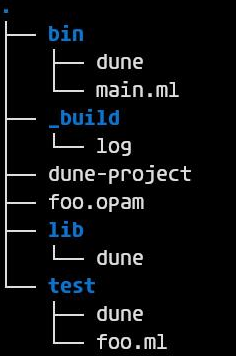
The bin folder contains the source file for the main executable
main.ml -
the
bin/dunefile has the build instruction for the executable, it’ll look something like this.(executable (public_name foo) (name main) (libraries foo))
Adding Support to build multiple executables
-
Let’s see how to add support to build another executable called bar, which we’ll write in the file called
bar.ml. -
First, create a file called
bar.mlin thebindirectory. -
Then you can update the
bin/dunefile support multiple executables like below.(executables (public_names foo bar) (name main bar) (libraries foo))
Build and run the different executable
You can use the following commands to run the different executables.
dune exec ./bin/main.exe
dune exec ./bin/bar.exe
To build you can run following
dune build ./bin/main.exe
dune build ./bin/bar.exe
To run the built executables
 ./_build/default/bin/main.exe
 ./_build/default/bin/bar.exe